
User`s guide




19
Chapter 3: BIOS Setup Utility
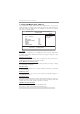
Some options on the main menu page lead to tables of items with installed values
that you can use cursor arrow keys to highlight one item, and press PgUp and PgDn
keys to cycle through alternative values of that item. The other options on the main
menu page lead to dialog boxes requiring your answer OK or Cancel by selecting the
[OK] or [Cancel] key.
If you have already changed the setup utility, press F10 to save those changes and
exit the utility. Press F1 to display a screen describing all key functions. Press F9
to install the setup utility with a set of default values.
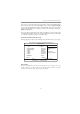
Standard CMOS Setup Page
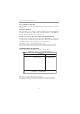
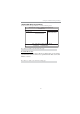
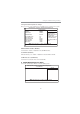
This page displays a table of items defining basic information about your system.
Date Wed 04/22/2009
f
Primary IDE Master Not Detected
Primary IDE Slave Not Detected
SATA 1 Hard Disk
SATA 2 Not Detected
SATA 3 Not Detected
SATA 4 Not Detected
IDE BusMaster Enabled
Drive A: 1.44 MB 3
1
/
2
”
Help Item
f
f
CMOS Setup Utility -- Copyright (C) 1985-2005, American Megatrends, Inc.
Time 00 : 02 : 16
User [Enter], [TAB] or
[SHIFT-TAB] to select a
field.
Use [+] or [-] to
configure system Date.
Standard CMOS Setup
mnlkmnlk
mnlkmnlk
mnlk
: Move F10: Save ESC: Exit
Enter : Select +/-/: Value
F9: Optimized Defaults
F1: General Help
f
f
f
Date & Time
The Date and Time items show the current date and time on the computer. If you are
running a Windows OS, these items are automatically updated whenever you make
changes to the Windows Date and Time Properties utility.