
User`s guide




18
Motherboard User’s Guide
Chapter 3 BIOS Setup Utility
Introduction
The BIOS Setup Utility records settings and information of your computer, such
as date and time, the type of hardware installed, and various configuration settings.
Your computer applies the information to initialize all the components when boot-
ing up and basic functions of coordination between system components.
If the Setup Utility configuration is incorrect, it may cause the system to malfunc-
tion. It can even stop your computer booting properly. If it happens, you can use
the clear CMOS jumper to clear the CMOS memory which has stored the configu-
ration information; or you can hold down the Page Up key while rebooting your
computer. Holding down the Page Up key also clears the setup information.
You can run the setup utility and manually change the configuration. You might
need to do this to configure some hardware installed in or connected to the
motherboard, such as the CPU, system memory, disk drives, etc.
Running the Setup Utility
Every time you start your computer, a message appears on the screen before the
operating system loading that prompts you to “Hit <DEL> if you want to run
SETUP” . Whenever you see this message, press the Delete key, and the Main
menu page of the Setup Utility appears on your monitor.
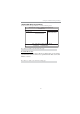
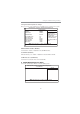
You can use cursor arrow keys to highlight anyone of options on the main menu
page. Press Enter to select the highlighted option. Press the Escape key to leave
the setup utility. Press +/-/ to modify the selected field’s values.
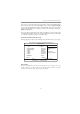
CMOS Setup Utility -- Copyright (C) 1985-2005, American Megatrends, Inc.
f
f
f
f
v02.67 (C)Copyright 1985-2009, American Mega trends, Inc.
f
: Move
F10: Save ESC: Exit
+/-/: Value
Enter : Select
F9: Optimized Defaults
F1:General Help
f
f
f
Standard CMOS Setup
Advanced Setup
Advanced Chipset Setup
Integrated Peripherals
Power Management Setup
PCI/PnP Setup
PC Health Status
Frequency/Voltage Control
Load Default Settings
Supervisor Password
User Password
Save & Exit Setup
Exit Without Saving
f
f
mnlkmnlk
mnlkmnlk
mnlk