
- Patton Electronics Network Hardware User Manual


Status LEDs 47
SmartNode 4900 User Manual 5 • LEDs status and monitoring
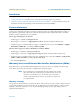
Status LEDs
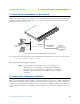
The front panel LEDs display the status of the power, system, VoIP channels, Ethernet ports, and call load.
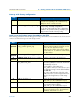
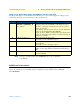
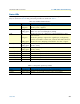
They are described in table 10. Rear panel serial port LEDs are described in table 11.
Table 10. SmartNode LED Indicators
LED Indication Description
Power Off
Solid green
Indicates no power is applied.
Indicates power is applied.
Run Solid green
Blinking green
Indicates normal operation.
Flashes once per second during boot (startup).
VoIP Off
Solid green
Blinking green
Indicates the unit is not configured or registered and has no active
VoIP connection.
Indicates the gateway is registered on a gatekeeper, media gateway
controller, associated to a remote unit, or has an active VoIP connection.
Indicates the unit is attempting or has failed to associate or register.
ETH 0/0 Solid green
Blinking green
Ethernet port 0 is up
Indicates activity
ETH 0/1 Solid green
Blinking green
Ethernet port 1 is up
Indicates activity
20% Call Load Green 20% of the voice ports are active
40% Call Load Green 40% of the voice ports are active
60% Call Load Green 60% of the voice ports are active
80% Call Load Green 80% of the voice ports are active
100% Call Load Green All of the voice ports are active
Table 11. Rear panel expansion port LEDs
LED Indication Description
Status Solid yellow Proper signals are present for modem communication
Activity Flashing yellow Transmit or receive traffic is present on the serial interface