
- Patton Electronics Network Hardware User Manual

1. Configure IP address 39
SmartNode 4900 User Manual 4 • Getting started with the SmartNode 4900 Series
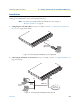
Connect to the RS-232 console port
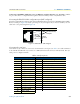
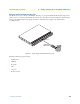
The RJ-45 Console port is wired as an EIA-561, RS-232 port. Use the included Model 16F-561 adapter and
cable (see figure 17) between the SmartNode’s Console port and a PC or workstation’s RS-232 serial interface.
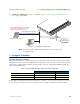
Activate the terminal emulation program on the PC or workstation that supports the serial interface
(e.g. HyperTerm).
Figure 17. Connecting to the RS-232 Console port
Terminal emulation program settings:
• Asynchronous
• 9600 bps
• No parity
• 8 bit
• 1 stop bit
• No flow control
100-240V
(50-60 Hz)
1 AMP
UNIT EQUIPPED WITH DUAL SUPPLIES
DISCONNECT BOTH SUPPLIES
BEFORE SERVICING
UNIT EQUIPPED WITH DUAL SUPPLIES
DISCONNECT BOTH SUPPLIES
BEFORE SERVICING
100-240V
(50-60 Hz)
1 AMP
ETH 0/0
NIC ADDRESS
00:A0:BA:00:04:10
Console Telco Ports
50
1
Reset
Expansion
ETH 0/1
Status
Activity
Console port
Laptop PC
Model 16F-561
adapter and cable