
Operating Instructions




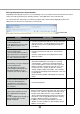


Table Of Contents
- Preface
- Before using this product
- Use an SD memory card
- Operation window
- Basic operation
- Login operation at startup
- Monitor live images
- Record images
- Play recorded images
- Play images from a designated point
- Search and play
- Play back copied images
- Event function
- Copy recorded images
- About the face matching function
- Operate the camera
- Configure the network settings
- Network security of the recorder
- Display the operation window
- About the operation window
- Monitor live images from cameras
- Play recorded images
- Play image recorded at a designated date & time
- Search and play recording events (REC event search)
- Motion detection search and playback (VMD search)
- Check a list of copied recorded images
- Event function
- Copy recorded images
- Download recorded images currently being played
- Play the copied/downloaded recorded images
- Operate the camera
- Setup
- Notification by e-mail
- Troubleshooting
- Glossary

96
97
Troubleshooting
Before asking for repairs, check the symptoms with the following table.
Contact your dealer if a problem cannot be solved even after checking and trying the solution in the table or a
problem is not described below.
Symptom Cause/solution
Reference
The message "Please insert a
medium." is displayed even after
an SDHC/HC memory card is
inserted.
• IfoperationsareperformedsoonafteranSDHC/SD
memory card is inserted, it may take time to recognize
the media. Close the message window and wait for a
while before retry.
–
The alarm buttons are the "Face
matching stopped" state even
though no operations are per-
formed to stop the face matching
function.
• Arethesettingsconfiguredasfollows?
Compression: H.264
Image capture size: SXVGA (1280 x 960)
Frame rate: 5 ips
Image quality: SF
The face matching function will become unavailable if
the settings are changed. Check whether the settings are
appropriate.
Installation
Guide
Cannot access from the browser.
• IstheEthernetcablefirmlyconnectedtothe10BASE-T,
100BASE-TXor1000BASE-Tport?
Confirm the cable is firmly connected.
Installation
Guide
• Istheconnectionindicatorofthe10BASE-T/100BASE-
TXportlit?Whenitisnotlit,connectiontoaLANisnot
established or a network is not working correctly.
Confirm that the connection indicator of the 10BASE-
T/100BASE-TX port is lit. Refer to the system administra-
tor if it is not lit.
Installation
Guide
• ArethesetIPaddressesvalid?
Refer to a system administrator for further information
about the settings.
Installation
Guide
• AreyouaccessingthewrongIPaddress?
Check the connection as follows.
>ping "IP address of this unit" If there is reply from this
unit, the connection is normal. If not, check the settings
of the IP address and the subnet mask.
−
• IsthesameIPaddressprovidedtootherdevices?
Refer to a system administrator for further information
about the settings.
Installation
Guide
• Aretherecontradictionsbetweentheaddressandthe
networksubnettobeaccessed?
When the recorder and the client (PC) are on the same
subnet, is the same subnet set for the IP addresses of
therecorderandthePC?Oris"UseProxyServer"for
thesettingsofthebrowserchecked?Whenaccessing
the recorder in the same subnet, entering the address of
the recorder in the "Don't Use Proxy For These
Addresses" box is recommended.
Installation
Guide
The image displayed on the brows-
er is not being refreshed.
• Dependingonthetrafficofthenetwork,theremightbe
difficulties in displaying images. Press the [F5] button on
the keyboard to request images.
−