
Operating Instructions






Table Of Contents
- Preface
- Before using this product
- Use an SD memory card
- Operation window
- Basic operation
- Login operation at startup
- Monitor live images
- Record images
- Play recorded images
- Play images from a designated point
- Search and play
- Play back copied images
- Event function
- Copy recorded images
- About the face matching function
- Operate the camera
- Configure the network settings
- Network security of the recorder
- Display the operation window
- About the operation window
- Monitor live images from cameras
- Play recorded images
- Play image recorded at a designated date & time
- Search and play recording events (REC event search)
- Motion detection search and playback (VMD search)
- Check a list of copied recorded images
- Event function
- Copy recorded images
- Download recorded images currently being played
- Play the copied/downloaded recorded images
- Operate the camera
- Setup
- Notification by e-mail
- Troubleshooting
- Glossary
92
93
Setup
Basic operations
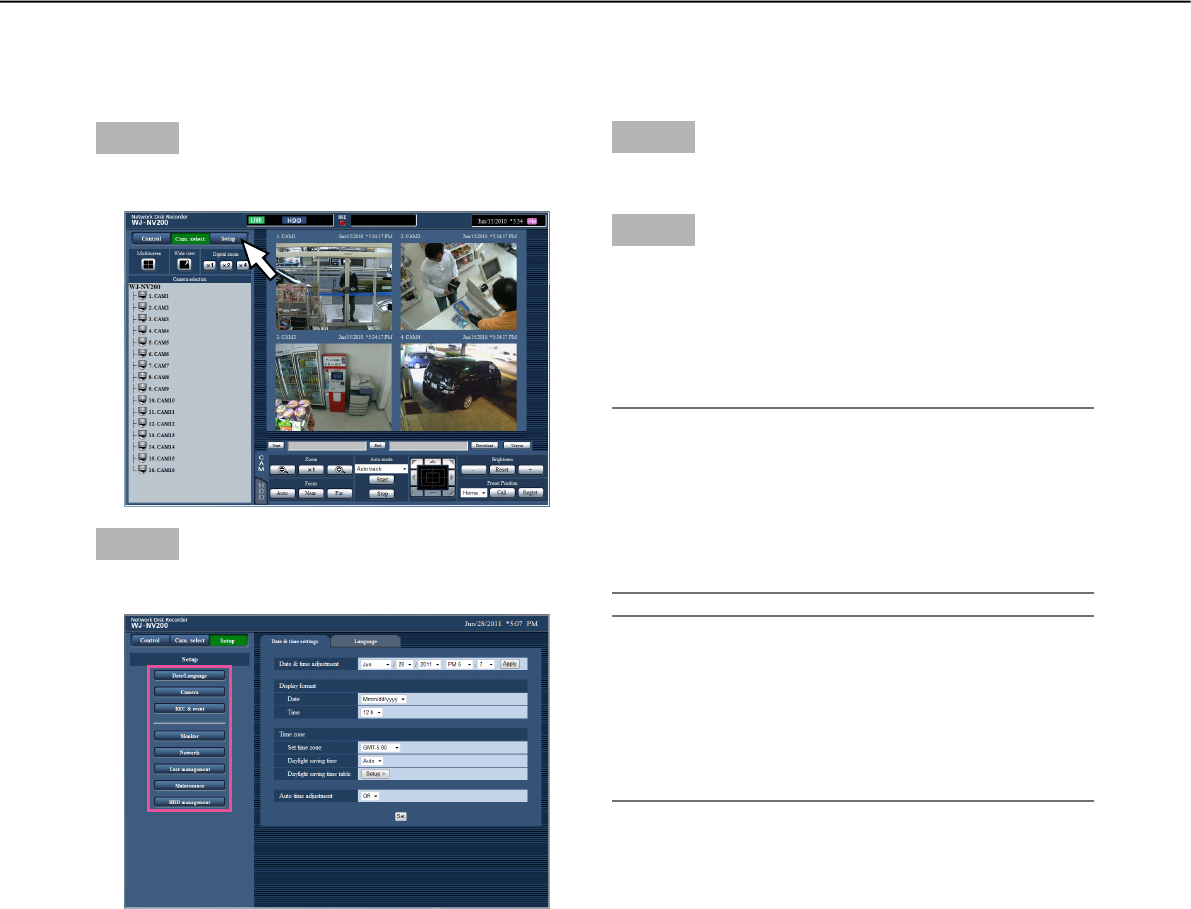
Step 1
Click the [Setup] button.
Step 2
Click the button for the desired menu.
Step 3
Click the button for the desired submenu.
Step 4
Configure each setting item. Click the [Set] button
after completing the settings.
→ The settings will be applied. When moving to
another page without clicking the [Set] button, the
configured settings will be canceled.
Important:
• Ifthesettingsareapplied,otherloginuserswillbe
forcibly logged out.
• Ifthesettingsrelatingtotheusermanagementare
applied, all login users will be forcibly logged out.
• Recordingmaynotbeperformedforaround4
seconds just after the settings are applied.
Note:
• IfthelicensefortheAdditionalBusiness
Intelligence Kit has been registered, it is possible
to save the statistics data on a PC. Refer to the
Operating Instructions of the Additional Business
Intelligence Kit for further information about the
statistical processing and how to operate.
Configure the settings
It is possible to configure the settings of the recorder using a web browser.
Refer to the Installation Guide for setup items that can be configured from the web browser and their further
information.