
Operating Instructions




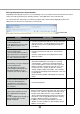


Table Of Contents
- Preface
- Before using this product
- Use an SD memory card
- Operation window
- Basic operation
- Login operation at startup
- Monitor live images
- Record images
- Play recorded images
- Play images from a designated point
- Search and play
- Play back copied images
- Event function
- Copy recorded images
- About the face matching function
- Operate the camera
- Configure the network settings
- Network security of the recorder
- Display the operation window
- About the operation window
- Monitor live images from cameras
- Play recorded images
- Play image recorded at a designated date & time
- Search and play recording events (REC event search)
- Motion detection search and playback (VMD search)
- Check a list of copied recorded images
- Event function
- Copy recorded images
- Download recorded images currently being played
- Play the copied/downloaded recorded images
- Operate the camera
- Setup
- Notification by e-mail
- Troubleshooting
- Glossary

90
91
Focus adjustment
Adjusts the focal point. The auto focus function is available.
Focusing can be adjusted by clicking the [Near] button or the [Far] button.
The auto focus function can be performed by clicking the [Auto] button.
Iris (brightness) adjustment
Adjusts the lens iris of the camera.
The brightness (lens iris) can be adjusted by clicking the [–] (darker) button or the [+] (brighter) button. It is pos-
sible to reset the adjusted brightness by clicking the [Reset] button.
Register preset positions
Registers the current camera position as a preset position. The preset positions can be registered only when
using a camera supporting the preset position function.
Step 1
Perform the pan/tilt operation to move the camera to
the position to be registered.
Step 2
Click the [C] button in the [Preset Position] box to
select a preset number (1 - 256). (It is impossible to
register the position as "Home".)
Step 3
Click the [Regist] button.
→ The preset position will be registered under the
selected preset number.
Move to preset positions
Moves the camera to the preset position registered in advance. Preset positions need to be registered in
advance.
Step 1
Click the [C] button in the [Preset Position] box to
select a preset number (Home, 1 - 256).
Step 2
Click the [Call] button.
→ The camera moves to the registered preset posi-
tion respective to the selected preset number.