
Operating Instructions




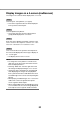

Table Of Contents
- Preface
- Before using this product
- Use an SD memory card
- Operation window
- Basic operation
- Login operation at startup
- Monitor live images
- Record images
- Play recorded images
- Play images from a designated point
- Search and play
- Play back copied images
- Event function
- Copy recorded images
- About the face matching function
- Operate the camera
- Configure the network settings
- Network security of the recorder
- Display the operation window
- About the operation window
- Monitor live images from cameras
- Play recorded images
- Play image recorded at a designated date & time
- Search and play recording events (REC event search)
- Motion detection search and playback (VMD search)
- Check a list of copied recorded images
- Event function
- Copy recorded images
- Download recorded images currently being played
- Play the copied/downloaded recorded images
- Operate the camera
- Setup
- Notification by e-mail
- Troubleshooting
- Glossary

66
67
[HDD] tab
[Preset Position] box
• [Regist]button
Registers the current camera position as a preset
position.
Select a preset position number (1 - 256) by click-
ing the [C] button after moving the camera to a
position to be registered as a preset position, and
then click the [Regist] button. It is impossible to
register the position as "Home".
[Call] button
Moves the camera to the preset position registered in
advance.
Select a preset position number (Home, 1 - 256) by
clicking the [C] button, and then click the [Call] but-
ton. It is necessary to register preset positions in
advance to move the camera to the preset positions.
[Play]/[Rev play] button
Plays recorded images in forward or reverse.
[FF]/[FR] button
Plays recorded images at high speed in forward or
reverse.
Playback speed of fast playback will change in the
following order each time this button is clicked:
Step2 (Approx. 4x) → Step3 (Approx. 8x) →
Step4 (Approx. 16x) → Step5 (Approx. 32x) →
Step6 (Approx. 48x) → Step7 (Approx. 96x)
[Next record]/[Prev record] button
Skips to the next recorded image or previous record-
ed image and plays it.
[Next image]/[Prev image] button
Clicking this button during playback/pausing will dis-
play the next or previous frame and playback will be
paused.
[Pause] button
Playback will be paused when this button is clicked
during playback. Playback will resume when this but-
ton is clicked during pause.
[Stop] button
Stops playback and displays live images.
[Go to last] button
Plays the latest recorded images of the camera cur-
rently being displayed. The starting point of playback
is around 30 seconds before the date & time of the
latest recorded images.
[Date search] box
Start playback by designating the desired date & time
of a recorded image. Click the [C] button and deter-
mine the desired date & time.
Clicking the [Date search] button will play back the
images corresponding to the selected date.