
Operating Instructions


Table Of Contents
- Preface
- Before using this product
- Use an SD memory card
- Operation window
- Basic operation
- Login operation at startup
- Monitor live images
- Record images
- Play recorded images
- Play images from a designated point
- Search and play
- Play back copied images
- Event function
- Copy recorded images
- About the face matching function
- Operate the camera
- Configure the network settings
- Network security of the recorder
- Display the operation window
- About the operation window
- Monitor live images from cameras
- Play recorded images
- Play image recorded at a designated date & time
- Search and play recording events (REC event search)
- Motion detection search and playback (VMD search)
- Check a list of copied recorded images
- Event function
- Copy recorded images
- Download recorded images currently being played
- Play the copied/downloaded recorded images
- Operate the camera
- Setup
- Notification by e-mail
- Troubleshooting
- Glossary
14
15
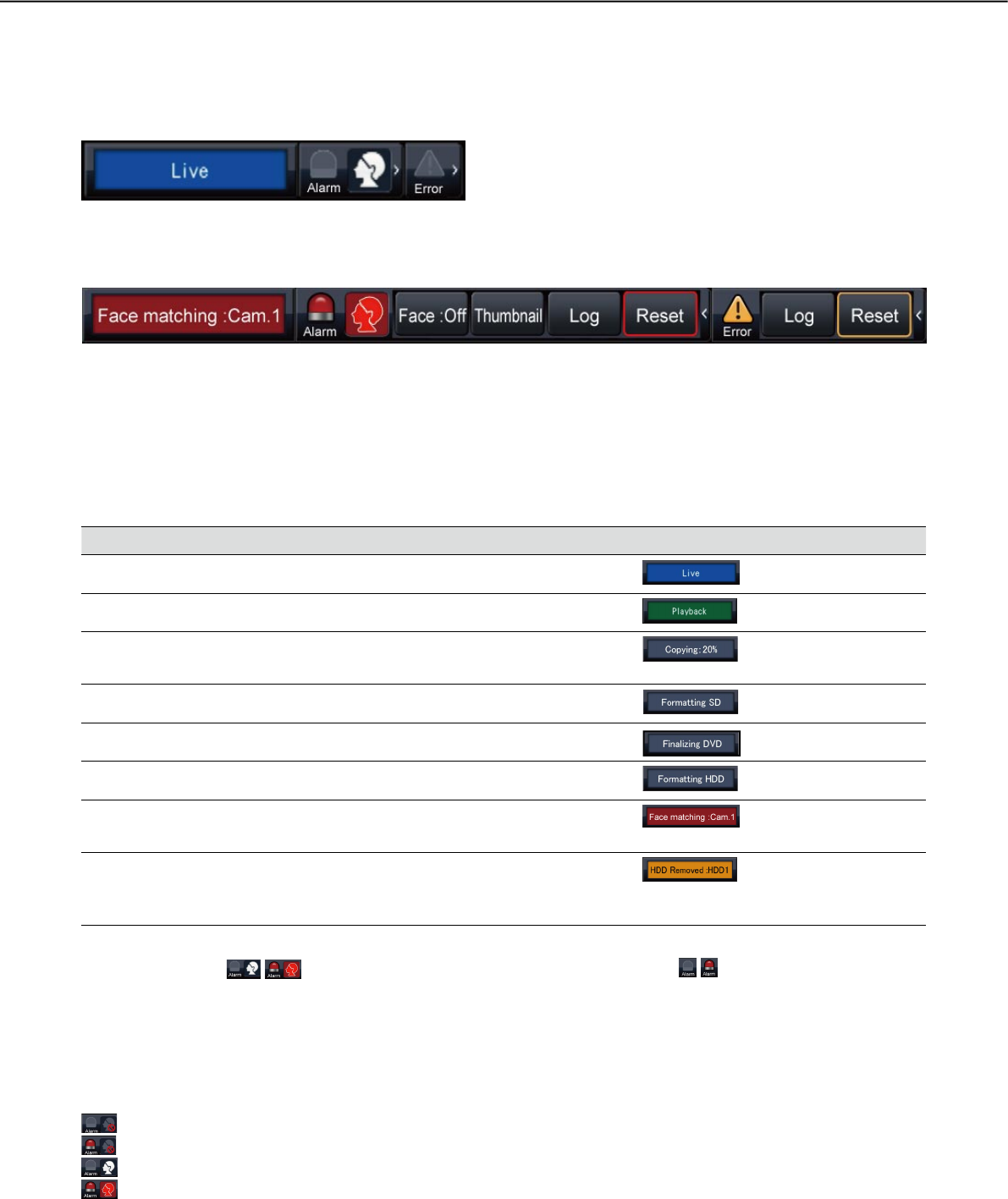
Status display panel
Normal operation
w e
wq i o e
t r
y u
In case of alarm/error (When the associated buttons are displayed)
q Status display area
Recorder status indications and their details are shown in the table below. In the event that the recorder
enters several statuses at the same time, these are displayed in their order of priority. If both statuses have
the same priority, the one that occurred last will be displayed.
Status Description Example Priority
Live Live images are being displayed. 5 (Low)
Playback Recorded images are being played. 5
Copying Data is being copied.
Copying progress is displayed in %.
4
Formatting SD SD memory card is being formatted. 4
Finalizing DVD The DVD disc is being finalized to eject. 4
Formatting HDD HDD is being automatically formatted. 3
In the alarm state Indicates an alarm occurrence. Detailed
information of the alarm will be displayed.
2
In the error state Indicates that an error has occurred. A
detailed description of the error content will
be displayed.
1 (High)
w Alarm buttons
(When the face matching function is not used:
)
Indicate that an alarm has occurred. Turn red in the alarm state. Clicking the buttons will toggle between
displaying/not displaying buttons such as the alarm log button and the alarm reset button.
<Face matching function>
If the face matching function has been configured for use, the following display functions and operations are
available:
Face matching stopped and Face matching alarm off
Face matching stopped and Face matching in alarm state
Face matching in operation and Face matching alarm off
Face matching in operation and Face matching in alarm state