
Operating Instructions



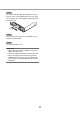
Table Of Contents
- Preface
- Before using this product
- Use an SD memory card
- Operation window
- Basic operation
- Login operation at startup
- Monitor live images
- Record images
- Play recorded images
- Play images from a designated point
- Search and play
- Play back copied images
- Event function
- Copy recorded images
- About the face matching function
- Operate the camera
- Configure the network settings
- Network security of the recorder
- Display the operation window
- About the operation window
- Monitor live images from cameras
- Play recorded images
- Play image recorded at a designated date & time
- Search and play recording events (REC event search)
- Motion detection search and playback (VMD search)
- Check a list of copied recorded images
- Event function
- Copy recorded images
- Download recorded images currently being played
- Play the copied/downloaded recorded images
- Operate the camera
- Setup
- Notification by e-mail
- Troubleshooting
- Glossary

10
11
Step 3
Place a disc with the label side up and fit the hole of
the disc to the center (spindle) of the tray. Then, push
the tray gently. Click sound will be heard and the disc
will fit in the tray.
Step 4
Push the tray to the end. Click sound will be heard
and the tray will be fixed.
Step 5
Close the DVD drive cover.
Important:
• Whenopening/closingtheDVDdrivetray,donot
apply force on the tray.
• WhennotusingtheDVDdrive,closethedisctray.
• Whenremovingthediscfromthetray,holdthe
spindle to detach the disc. If trying to detach the
disc forcibly, it can damage both the disc and the
DVD drive.
Spindle