
Installation Guide





76
Configure the settings and operations relating to the system
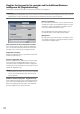
[System management]
The settings relating to the actions at an error occurrence and auto data deletion from hard disk drives can be configured on this
tab. It is also possible to display the logs on this page. In addition, general maintenance, such as license registration, setting ini-
tialization and firmware upgrade, can be performed on this tab.
■ System setup
[Error buzzer duration]
Configure the settings to sound a buzzer at an error occur-
rence. When "0 s" is selected, buzzer will not sound.
0 s/ 2 s/ 5 s/ 10 s/ 20 s/ 30 s/ 1 min
Ext.: When "Ext." is selected, the buzzer that started
sounding at an error occurrence will keep on sound-
ing until the buzzer is stopped.
Default: 2 s
Note:
• RefertotheOperatingInstructions(PDF)forfurtherinfor-
mation about the buzzer stop.
[Error output duration]
Select the duration to output a signal to notify the external
devices of an error (HDD error camera error, recorder error,
recording error or network error).
When "0 s" is selected, the signal is not output.
0 s/ 2 s/ 5 s/ 10 s/ 20 s/ 30 s/ 1 min
Ext.: When "Ext." is selected, the signal will keep on
being output until the error is reset.
Default: 2 s
Note:
• RefertotheOperatingInstructions(PDF)forfurtherinfor-
mation about the error reset.
[Network link down detection]
Select "On" or "Off" to determine whether or not to detect
the network disconnection on the network port of the
recorder.
On: Detects the network disconnection.
Off: Does not detect the network disconnection.
Default: Off
[HDD hour meter warning]
If the operation time of a hard disk drive reaches a specified
level, a warning will be performed. When "Off" is selected,
warning will not be performed.
Off/ 10000h/ 20000h/ 30000h/ 40000h/ 50000h
Default: 20000h
[Auto data delete]
Select to determine how many days should have passed
from the recorded day to delete data automatically from the
hard disk drive.
Off/ 1 day/ 2 days/ 3 days/ 4 days/ 5 days/ 6 days/
7 days/ 8 days/ 9 days/ 10 days/ 14 days/ 30 days/
45 days/ 60 days/ 90 days/ 120 days/ 150 days/
180 days
Default: Off (Does not delete the data automatically.)
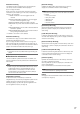
■ Logs
The following logs can be checked.
• Accesslog:Logsofaccessingtherecorder
• Networklog:Logsofnetworkerrors
To check each log, click the [View >] button.
Note:
• Whileoverwritingrecordingisbeingperformed,theoverwritingcyclewillbecalculatedbasedonthedate&timeoftheoldest
recorded data and that of the newest recorded data.
• Themoreoftentherecordingwasperformedinthepast,themoreaccuratethecalculationofoverwritingcyclewillbe.
• Whentherecordingconditionsarechangedorwhendataisautomaticallydeleted,theoverwritingcyclewillnotbeindicated
accurately.