
Installation Guide






23
Operations flow
z
Obtain the license (Registration Key)
☞ Activation Key Card
x
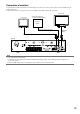
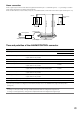
Connection
☞ Page 24
c
Turn on the recorder
☞ Page 32
v
Register the license (Registration Key)
☞ Page 34
b
Quick setup
☞ Page 39
n
Basic setup and
Advanced setup
☞ Pages 42-79
Start operations
➜ ➜
z Obtain the "Registration Key" of the recorder by follow-
ing the instructions on the provided Activation Key Card.
x Install hard disk drives in the recorder (☞ page 29) and
connect the recorder to each device.
c Turn on the power of the recorder.
v If necessary, register the "Registration Key" for the
recorder and that for the Additional Business Intelligence
Kit.
Important:
• Besuretoregisterthe"RegistrationKey"oftherecorder.
b Register the date & time and cameras on "Easy Start".
When it is not necessary to change other default set-
tings, it is possible to start operations. After cameras are
added or replaced, register the cameras on "Easy Start".
n If necessary, perform the detailed settings for each func-
tion.
Note:
• Somefunctionsarenotsupporteddependingonthe
models of the connected cameras. For further informa-
tion about detailed specifications, refer to the operating
instructions of the cameras in use.
➜ ➜ ➜ ➜