Panasonic Projector RS-232C Control Specifications PT-FW300NT/FW300/F300NT/F300
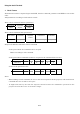
Using the Serial Terminal 1. Basic Format Transmission from the computer begins with STX, then the command, parameter and ETX are sent in this order. Add parameters according to the details of control.
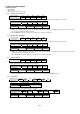
2. Basic Control Command Explanatory notes ○: Yes (Enable) ×: No (Disable) △: Case by case (Refer to the note.) 2.1. Power ON (Lamp ON) Hexadecimal 02h 50h 4Fh 4Eh 03h Character P O N Response (Callback) In the period when the command can be accepted (This command in power-on condition is included.
2.5. FREEZE Hexadecimal 02h 4Fh 46h 5Ah 3Ah Character O F Z : Parameters (*1, *2) FREEZE OFF FREEZE ON Hexadecimal 30h 31h Character 0 1 Response (Callback) In the period when the command can be accepted Hexadecimal 02h 4Fh 46h 5Ah Character O F Z Acceptability SECURITY STANDBY NO SIGNAL AV MUTE × × × × 2.6.
2.9. Navigation Up (↑) Hexadecimal 02h 4Fh 43h 55h Character O C U Response (Callback) In the period when the command can be accepted Hexadecimal 02h 4Fh 43h 55h Character O C U Acceptability SECURITY STANDBY NO SIGNAL AV MUTE ○ × ○ × 03h 03h REMOTE ○ 2.10.
2.15. VOLUME + Hexadecimal 02h 41h 55h 55h 03h Character A U U Response (Callback) In the period when the command can be accepted Hexadecimal 02h 41h 55h 55h 03h Character A U U Acceptability SECURITY STANDBY NO SIGNAL AV MUTE REMOTE × △ × × ○ Note: • During STANDBY, this command is available only when IN STANDBY MODE is ON. 2.16.
2.20. COMPUTER SEARCH Hexadecimal 02h 4Fh 50h 43h 03h Character O P C Response (Callback) In the period when the command can be accepted Hexadecimal 02h 4Fh 50h 43h 03h Character O P C Acceptability SECURITY STANDBY NO SIGNAL AV MUTE REMOTE × × ○ × ○ Note: • This command is available only for PT-FW300NT**/F300NT**. 2.21.
2.24.
2.27.
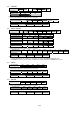
2.30. COLOR TEMPERATURE Hexadecimal 02h 4Fh 54h 45h 3Ah Character O T E : Parameters (*1, *2) LOW DEFAULT HIGH Hexadecimal 30h 31h 32h Character 0 1 2 Response (Callback) In the period when the command can be accepted Hexadecimal 02h 4Fh 54h 45h Character O T E Acceptability SECURITY STANDBY NO SIGNAL AV MUTE × × × × *1 *2 03h 3Ah : *1 *2 03h REMOTE ○ 2.31.
2.32. TV-SYSTEM Hexadecimal 02h 56h 53h 47h 3Ah *1 *3 *5 03h Character V S G : *2 *4 *6 Parameters (*1, *2, *3, *4, *5, *6) AUTO NTSC NTSC4.
2.35.
2.38.
2.41.
2.44.
2.47. COMPUTER2 SELECT Hexadecimal 02h 4Fh 52h 49h 3Ah *1 Character O R I : *2 Parameters (*1, *2, *3, *4, *5, *6) INPUT OUTPUT Hexadecimal 32h 49h 4Eh 32h 4Fh 55h Character 2 I N 2 O U Response (Callback) In the period when the command can be accepted *1 *3 Hexadecimal 02h 4Fh 52h 49h 3Ah Character O R I : *2 *4 Acceptability SECURITY STANDBY NO SIGNAL AV MUTE REMOTE × × ○ ○ ○ Note: • This command is not available when COMPUTER2 is selected. *3 *4 *5 *6 *5 *6 03h 2.48.
2.51. SIGNAL SEARCH Hexadecimal 02h 4Fh 53h 52h 3Ah Character O S R : Parameters (*1, *2) OFF ON Hexadecimal 30h 31h Character 0 1 Response (Callback) In the period when the command can be accepted Hexadecimal 02h 4Fh 53h 52h Character O S R Acceptability SECURITY STANDBY NO SIGNAL AV MUTE × ○ ○ ○ *1 *2 03h 3Ah : *1 *2 03h REMOTE ○ 2.52.
2.55. SXGA MODE Hexadecimal 02h 4Fh 53h 58h 3Ah Character O S X : Parameters (*1, *2) SXGA SXGA+ Hexadecimal 30h 31h Character 0 1 Response (Callback) In the period when the command can be accepted Hexadecimal 02h 4Fh 53h 58h Character O S X Acceptability SECURITY STANDBY NO SIGNAL AV MUTE × × × × *1 *2 03h 3Ah : *1 *2 03h *1 *2 03h *1 *2 03h REMOTE ○ 2.56.
2.59.
2.62. Wireless LAN OFF Hexadecimal 02h 4Fh 52h 43h 3Ah *1 03h Character O R C : *2 Parameters (*1, *2) OFF Hexadecimal 31h Character 1 Response (Callback) In the period when the command can be accepted Hexadecimal 02h 4Fh 52h 43h 3Ah *1 Character O R C : *2 Acceptability SECURITY STANDBY NO SIGNAL AV MUTE REMOTE × × ○ × ○ Note: • This command is available only for PT-FW300NT**/F300NT**. 03h 2.63.
2.65. REWIND ALL FILTER / Rewinding interval setting Hexadecimal Character Parameters (*1, *2) 02h 4Dh M 46h F 53h S REWIND 100H 400H Hexadecimal 30h 31h 32h Character 0 1 2 Response (Callback) In the period when the command can be accepted Hexadecimal 02h 4Dh 46h 53h 3Ah Character M F S : Acceptability SECURITY STANDBY NO SIGNAL AV MUTE × × ○ × 3Ah : *1 *2 *1 *2 03h 03h REMOTE ○ 2.66.
2.69. EDID Setting Hexadecimal Character Parameters (*1, *2) 02h 4Fh O 45h E 44h D 3Ah : *1 *2 03h EDID1 (Moving image) EDID2 (PC) Hexadecimal 31h 32h Character 1 2 Response (Callback) In the period when the command can be accepted *1 03h Hexadecimal 02h 4Fh 45h 44h 3Ah Character O E D : *2 Acceptability SECURITY STANDBY NO SIGNAL AV MUTE REMOTE × ○ ○ ○ ○ 2.70.
2.73. OVER SCAN Hexadecimal Character Parameters (*1, *2) 02h 4Dh M 4Fh O 56h V 3Ah : *1 *2 03h 0 1 2 3 Hexadecimal 30h 31h 32h 33h Character 0 1 2 3 Response (Callback) In the period when the command can be accepted *1 03h Hexadecimal 02h 4Dh 4Fh 56h 3Ah Character M O V : *2 Acceptability SECURITY STANDBY NO SIGNAL AV MUTE REMOTE × × × × ○ Note: • This command is available only when moving image is displayed. In other cases, ER401 is returned. 2.74.
2.77. TEST PATTERN display Hexadecimal 02h 4Fh 53h 56h Character O S V Response (Callback) In the period when the command can be accepted Hexadecimal 02h 4Fh 53h 56h 03h Character O S V Acceptability SECURITY STANDBY NO SIGNAL AV MUTE × × ○ ○ 03h REMOTE ○ 2.78.
2.81.
2.83.
2.84.
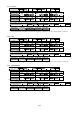
2.85. AUDIO SETTING Hexadecimal 02h 56h 58h 58h 3Ah 41h Character V X X : A Hexadecimal *1 3Dh 2Dh *3 *5 *7 Character *2 = + *4 *6 *8 Parameters (*1, *2) COMPUTER1 Hexadecimal 30h Character 0 COMPUTER2 Hexadecimal 31h Character 1 DVI Hexadecimal 32h Character 2 Parameters (*3, *4, *5, *6, *7, *8, *9, *10, *11, *12) COM.
2.88. Query INPUT SELECT Hexadecimal 02h 51h 49h 4Eh 03h Character Q I N Response (Callback) COMPUTER1 Hexadecimal 02h 52h 47h 31h Character R G 1 COMPUTER2 Hexadecimal 02h 52h 47h 32h Character R G 2 VIDEO Hexadecimal 02h 56h 49h 44h Character V I D S-VIDEO Hexadecimal 02h 53h 56h 44h Character S V D DVI Hexadecimal 02h 44h 56h 49h Character D V I NETWORK Hexadecimal 02h 4Eh 57h 50h Character N W P Acceptability SECURITY STANDBY NO SIGNAL AV MUTE ○ × ○ ○ 03h 03h 03h 03h 03h 03h REMOTE ○ 2.89.
2.91.
2.94. Query CONTRAST Hexadecimal 02h 51h 56h 52h 03h Character Q V R Response (Callback) In the period when the command can be accepted Hexadecimal 02h *1 *3 *5 03h Character *2 *4 *6 Acceptability SECURITY STANDBY NO SIGNAL AV MUTE REMOTE ○ × × ○ ○ Parameters (*1, *2, *3, *4, *5, *6) -32 -31 Hexadecimal 2Dh 33h 32h 2Dh 33h Character - 3 2 - 3 30 31 Hexadecimal 30h 33h 30h 30h 33h Character 0 3 0 0 3 31h 1 2Dh - 31h 1 30h 0 31h 1 2Dh - 31h 1 30h 0 -30 33h 3 32 33h 3 30h 0 32h 2 2.95.
2.97.
2.100.
2.103.
2.106. Query KEYSTONE Hexadecimal 02h 51h 4Bh 53h 03h Character Q K S Response (Callback) In the period when the command can be accepted Hexadecimal 02h *1 *3 *5 03h Character *2 *4 *6 Acceptability SECURITY STANDBY NO SIGNAL AV MUTE REMOTE ○ ○ ○ ○ ○ Parameters (*1, *2, *3, *4, *5, *6) -32 -31 Hexadecimal 2Dh 33h 32h 2Dh 33h 31h Character - 3 2 - 3 1 30 31 Hexadecimal 30h 33h 30h 30h 33h 31h Character 0 3 0 0 3 1 2Dh - 30h 0 -30 33h 3 32 33h 3 30h 0 32h 2 2.107.
2.109.
2.112. Query FRAME LOCK Hexadecimal 02h 51h 46h 4Ch 03h Character Q F L Response (Callback) In the period when the command can be accepted Hexadecimal 02h *1 03h Character *2 Acceptability SECURITY STANDBY NO SIGNAL AV MUTE ○ × × ○ Parameters (*1, *2) OFF ON Hexadecimal 30h 31h Character 0 1 REMOTE ○ 2.113.
2.115. Query STARTUP LOGO Hexadecimal 02h 51h 4Ch 4Fh 03h Character Q L O Response (Callback) In the period when the command can be accepted Hexadecimal 02h *1 03h Character *2 Acceptability SECURITY STANDBY NO SIGNAL AV MUTE ○ ○ ○ ○ Parameters (*1, *2) OFF ON USER Hexadecimal 30h 31h 32h Character 0 1 2 REMOTE ○ 2.116.
2.119. Query AUTO SETUP setting Hexadecimal 02h 51h 53h 53h 03h Character Q S S Response (Callback) In the period when the command can be accepted Hexadecimal 02h *1 03h Character *2 Acceptability SECURITY STANDBY NO SIGNAL AV MUTE ○ × ○ ○ Parameters (*1, *2) BUTTON AUTO Hexadecimal 30h 31h Character 0 1 REMOTE ○ 2.120.
2.123. Query OSD DESIGN Hexadecimal 02h 51h 4Fh 44h 03h Character Q O D Response (Callback) In the period when the command can be accepted Hexadecimal 02h *1 03h Character *2 Acceptability SECURITY STANDBY NO SIGNAL AV MUTE ○ ○ ○ ○ Parameters (*1, *2) TYPE1 TYPE2 TYPE3 Hexadecimal 30h 31h 32h Character 0 1 2 REMOTE ○ 2.124.
2.127.
2.130. Query Date Hexadecimal 02h 51h 47h 44h 03h Character Q G D Response (Callback) In the period when the command can be accepted Hexadecimal 02h *y1 *y2 *y3 *y4 *m1 *m2 *d1 *d2 *w Character Parameters (*1, *2, *3, *4, *5, *6) *y1 - *y4: Year (4 digits) *m1, *m2: Month (2 digits) *d1, *d2: Day (2 digits) *w: Day of the week (Mon = 1, Tue = 2, Wed = 3, Thu = 4, Fri = 5, Sat = 6, Sun = 7) Set it by UTC (Coordinated Universal Time).
2.133.
2.137. Query Serial Number Hexadecimal 02h 51h 53h 4Eh 03h Character Q S N Response (Callback) Example: SB12345678 Hexadecimal 02h 41h 42h 31h 32h 33h 34h 35h Character S B 1 2 3 4 5 Acceptability SECURITY STANDBY NO SIGNAL AV MUTE REMOTE ○ × ○ ○ ○ 36h 6 37h 7 38h 8 03h 2.138.
2.141. Query SCREEN FORMAT Hexadecimal 02h 51h 53h 46h 03h Character Q S F Response (Callback) In the period when the command can be accepted Hexadecimal 02h *1 03h Character *2 Acceptability SECURITY STANDBY NO SIGNAL AV MUTE REMOTE ○ × ○ ○ ○ Parameters (*1, *2) 16:10 16:9 Hexadecimal 30h 31h Character 0 1 Note: • This command is acceptable only for PT-FW300 series. In other models, ER401 is returned. 2.142.
2.145.
2.148.
2.150.
2.151.