
Operating Instructions





Network
ENGLISH -
87
Settings
CRESTRON RoomView page
J
You can monitor or control the projector using RoomView.
To display the operation page of RoomView from Web Control screen, access with the administrator rights is
required. (The [CRESTRON RoomView] button is not displayed on the Web Control screen for user rights.)
When you click [CRESTRON RoomView], the RoomView operation page is displayed.
If Adobe Flash Player is not installed in your computer, or if the browser does not support Flash, this page does
not appear. In this case, return to the previous page by clicking [Back] in the operation page.
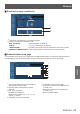
Operation page
1
[Logout], [Tools], [Info], [Help]
Exit the page when the password has changed and
switches the pages for tools, information, help using
the tab.
2
[POWER]
Switches between on and off of the power.
3
[VOL DOWN], [AV MUTE], [VOL UP]
Sets the volume, AV mute. When the power of the
projector is turned off, VOL DOWN, AV MUTE and
VOL UP are not available.
4
[Input Select]
Sets the input selection. When the power of the
projector is turned off, this operation is not available.
5
Operation buttons on the menu screen
Operates on the menu screen.
6
Freeze, Image quality adjustment
Sets freeze, image quality details.
7
[Back]
Returns to the previous page.
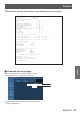
[Tools] page
Click [Tools] on the operation page.
1
[Control system]
Sets the information required for the communication
with the controller that is connected to the projector.
2
[User Password]
Sets the password for the user rights in the operation
page of RoomView.
3
[Admin Password]
Sets the password for the administrator rights in the
operation page of RoomView.
4
Network status
Displays the setting of wired LAN.
[DHCP]: Displays the value in the current setting.
[IpAddress]: Displays the value in the current setting.
[SubnetMask]: Displays the value in the current setting.
[DefaultGateway]:
Displays the value in the current
setting.
[DNSServer]: Displays the value in the current setting.
5 [Exit]
Return to the operation page.
1
2
3
4
5
6
7
1
2
3
4
5