
Operating Instructions





ENGLISH -
23
Preparation
Using Remote control
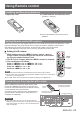
Installing and Removing batteries
Open the cover1 ) Install batteries and close the cover2 )
(Insert the – side rst.)
Remove the batteries in the reverse order of
z
installation.
Setting Remote control ID numbers
When you use the system with multiple projectors, you can operate all the projectors simultaneously or each
projector individually using single remote control, if unique ID number is assigned to each projector.
After setting the ID number of the projector, set the same ID number to the remote control.
There are 65 different ID codes (All, Code 1~Code 64), the initial ID number is [All].
J
Setting the ID number
1)
While holding down the <MENU> button, enter a 1-digit or
2-digit number corresponding to the desired ID code number
by using the number buttons 0 to 9.
2)
The ID code is changed when the <MENU> button is released.
3)
The examples are as follows
:
Code 1= <MENU>+<1> or <MENU>+ <0> + <1> ,
Code 2= <MENU>+<2> or <MENU>+ <0> + <2>,
Code 16= <MENU>+ <1> + <6>,
Code 64= <MENU>+ <6> + <4>
Note
The remote control transmission is disabled during the ID code change procedure.
z
The ID code is reset to [All] (default) by pressing the <MENU> button and <0> button at the
z
same time for 5 seconds or more.
For details, please refer to the [Remote control] of the [Setting] menu. (
z
Æ
page 66)
Connecting to the projector with a cable
When controlling the projector by wired remote control,
connect the <REMOTE IN> terminal on the projector to
the remote control wired terminal on the remote control by
a commercial M3 stereo mini jack cable.
The remote control is effective even in places where an
obstacle stands in the light path or where devices are
susceptible to outside light.
Attention
Use a cable that is 15m (49'3") or shorter, with dual core
z
shielded. The remote control may not operate when the length
of the cable exceeds 15m (49'3") or when the shielding of the
cable is inadequate.
MENU
button
Number
buttons
Remote
control
Connecting to the remote
control wired terminal
M3 stereo mini jack cable
(commercially available)
Connecting terminals