
Operating instructions


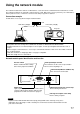


78
ENGLISH
Operating procedure
Press the MENU button. ... The MENU screen will be displayed.
Press the UP ( ) and DOWN ( ) arrow buttons to select OPTION.
Press the ENTER button. ... The OPTION screen will be displayed.
Press the UP ( ) and DOWN ( ) arrow buttons to select NETWORK
MODULE SETTING.
Press the ENTER button. ... NETWORK MODULE SETTING screen will be
displayed.
Press the UP ( ) and DOWN ( ) arrow buttons to select each item and
press the ENTER button to change the setting.(refer to next page)
Press the UP ( ) and DOWN ( ) arrow buttons to select STORE and
press the ENTER button twice.
• After the online lamp of the network module goes out, it lights up again.
MENU
AUTO SETUP
LENS
PICTURE
POSITION
OPTION
SIGNAL LIST
TEST PATTERN
MENU :
EXIT : MENU
Initial setting of network module
NETWORK MODULE SETTING
HOST NAME : PROJ01
DHCP : OFF
IP ADDR : 192. 168. 0.8
NET MASK : 255. 255. 255.0
GATEWAY : 192. 168. 0.1
MAC ADDR : 01-02-03-
04-05-06
STORE
MENU :
POSITION :
ADJUST : 0-9
EXIT : MENU
OPTION
SET RUNTIME : nnnnnh
LAMP POWER : ******
CONTRAST MODE : **
RS-232C SETTING
SYSTEM INFORMATION
VIDEO MODULE SETTING
NETWORK MODULE SETTING
PASSWORD
MENU :
SUB MENU : ENTER
EXIT : MENU
• It takes about 2 minutes for settings to take effect.
• Do not turn off the main power supply until the online lamp of the network
module lights up again.
NOTE