
Facsimile Quick Reference Guide



16
Receiving faxes
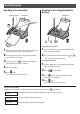
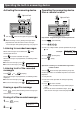
2When receiving a call, the unit will receive a fax
document or record a voice message automatically
depending on the caller’s request.
light on
Receiving a fax automatically
(AUTO ANSWER on)
1If the (Auto answer) light is off, turn it on by
pressing .
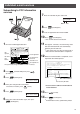
Recording your own greeting
message
You can record your own greeting message. When
receiving a call, it will be played to callers instead of the
pre-recorded Japanese greeting message.
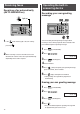
3Press (Set/Register).
5Press (Start) and speak your greeting message,
up to 16 seconds, to the handset.
6Press (Stop) and replace the handset.
●
Your greeting message will be played back
automatically.
1Press (Function/Edit).
2Press .
ジサクア オウトウア ロクオン
カイセシシシシ[ ケッテイ] オス
4Lift the handset.
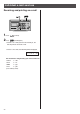
Erasing your own greeting message
2Press .
1Press (Function/Edit).
ジサクセ オウトウセ ショウキョ
カイセシシシシ[ ケッテイ] オス
3Press (Set/Register).
4Press .
●
The pre-recorded Japanese greeting message will
be played when you receive a call.
Operating the built-in
answering device