
Facsimile Quick Reference Guide

4
Installations and connections
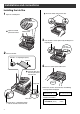
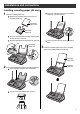
Installing the ink film
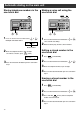
2 Insert the ink film.
1 Open the control panel.
Find the “T” shaped gear (blue).
Ink film
Right slot
Blue core
Insert the “T” shaped gear (blue)
into the left slot of the main unit.
Control panel
Press here.
1
Open the control
panel until it locks.
2
2
Insert the blue core
into the right slot of
the main unit.
1
Do not
be slacken.
Click
3 If the ink film is slack, tighten it by winding the “T”
shaped gear.
4 Close the control panel until it locks.
Insert the white core into the slots.
3
●
When the unit runs out of ink film, the following
message will be displayed.
Install a new ink film.
・
As of May 2003.
・
Tax not included.
フィルムガシ ナクナリマシタ
ヒンバン
:
KX-FAN141
フィルムガシ ナクナリマシタ
コウカンシテクダサイシ
U23
Replacement ink film:
KX-FAN141 (50 m) ¥1400