
Facsimile Quick Reference Guide
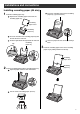
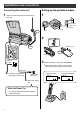
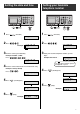
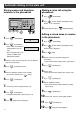

4. Press to move the cursor to the next space
and press four times.
8
2Press .
3Enter your logo, up to 30 characters, using the dial
keypad.
●
To enter English characters easily, press
(Character input mode) repeatedly and select
“英” (English and sign input mode).
●
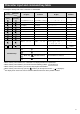
For details, see the table on page 9 for instructions.
文字切替
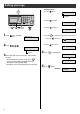
5Press (Stop).
Setting your logo
2. Press six times.
3. Press six times.
5. Press five times.
Example: Micah
1. Press once.
4Press (Set/Register).
決定/登録
1Press (Function).
機能登録モード
10
月
01
日
ア
15
:
45
用件録音
ア
13
:
00
件
Example :
M
Cursor
M
i
Mi
c
Mic
a
Mica
h
Micah
>_
登録
しました
M
名前(印刷用)
?
>_
Cursor