
Facsimile Quick Reference Guide



4
Installations and connections
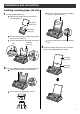
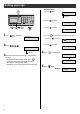
Installing the ink film
2 Insert the ink film.
1 Open the control panel and the back cover.
Do not
be slacken.
押す
Click
Click
開く
Open the control
panel until it locks.
1
3 If the ink film is slack, tighten it by winding the “T”
shaped gear.
4 Close the back cover and the control panel until they
lock.
●
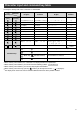
When the unit runs out of ink film, the following
message will be displayed.
Install a new ink film.
・
As of June 2003.
・
Tax not included.
フィルム
か
゙
なくなりました
U23
品番
:
KX
ー
FAN142
フィルム
か
゙
なくなりました
U23
交換
してくた
゙
さい
Replacement ink film:
KX-FAN142 (35 m) ¥1250
Open the back cover
until it locks.
3
Press here.
2
Find the “T” shaped gear (blue).
Ink film
Blue core
Insert the “T”
shaped gear
(blue) into the
left slot of the
main unit.
2
Insert the white core into the slots.
3
Insert the blue
core into the
right slot of the
main unit.
1
Click
To close the back cover, press here.
1
Close the control panel until it locks.
2