
Facsimile with Cordless Phone Quick Reference Guide

Answering Device Functions
8
1
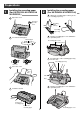
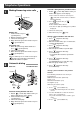
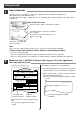
Recording your own greeting
message
Handset
ストップ
録音(応答/通話)
スタート
/コピー
1. Press (record).
2. Lift the handset.
3. Press (start/copy).
4. Record your greeting message up to
16 seconds.
5. Press (stop) and replace the handset.
– The greeting message will be played back
once automatically.
ストップ
スタート
/コピー
録音(応答/通話)
2
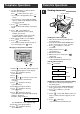
Erasing the greeting message
消去
スタート
/コピー
1. Press (erase) two times.
2. Press (start/copy).
スタート
/コピー
消去
3
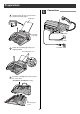
Setting up the automatic
answering device
留守
123
456
78
0
9
Press (auto answer).
●
To cancel the automatic answering device
mode, press (auto answer) again.
留守
留守
4
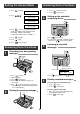
Listening to recorded
messages
123
456
78
0
9
留守
10
月
15
日
17
:
35
ヨウケン ロクオン
03ケン
録音残
Received calls
memory indicator
プライベート 1
Call counter
Press (auto answer) or (repeat).
聞き直し
留守
5
Erasing recorded messages
To erase all the recorded messages
1. Press (erase).
2. Press (start/copy).
To erase a specific message
1. Press (erase) while listening to the
message you want to erase.
2. Press (start/copy).
スタート
/コピー
消去
スタート
/コピー
消去
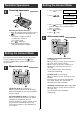
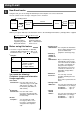
1. Press (function).
2. Press .
3. Press (select) to select the Facsimile
mode (FAXセンヨウ) or Answering machine
mode (ルスデ ンセンヨウ) or Answering
machine/Facsimile mode (FAX/ルスデン).
4. Press (register).
5. Press (stop).
6. Press (auto answer).
留守
ストップ
登録
選択
1 2 0
機能
or
or
ルス
=FAX
/ルスデン
[センタク, トウロク]
ルス
=
ルスデンセンヨウ
[センタク, トウロク]
ルス
=FAX
センヨウ
[センタク, トウロク]
キノウ トウロク モード
Setting the Answer Mode
Answering Device Functions