
Facsimile with Cordless Phone Quick Reference Guide

2
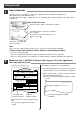
Receiving documents
Handset
スピーカーホン
スタート
/コピー
Facsimile Operations
7
1
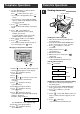
Manual answer mode
This unit has five Answer modes. Choose the desired
mode according to your needs. Press (auto
answer) to switch between manual answer and auto
answer modes.
留守
123
456
78
0
9
ストップ
登録
選択
機能
留守
Telephone mode (デンワユウセン)
When you want to answer all calls manually.
After answering the call, press the start button
for fax reception.
Facsimile/Telephone mode (FAXユウセン)
When you want to answer voice calls but do
not want to be disturbed by fax calls.
If no one answers the call, the unit will receive
the documents automatically. Or you can
answer the call and press the start button for
fax reception.
2
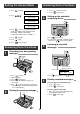
Auto answer mode
123
456
78
0
9
ストップ
登録
選択
機能
留守
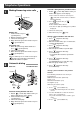
Receiving documents manually
1. When the unit rings, lift the handset or press
(speakerphone) to answer the call.
2. When:
– document reception is required,
– a slow beep is heard, or
– no sound is heard,
press (start/copy).
3. Replace the handset if using it.
– The unit will start fax reception.
スタート
/コピー
スピーカーホン
Answering machine/Facsimile mode
(FAX/ルスデン)
When you want to use the unit to record voice
messages and receive documents.
When a call is received, the unit plays your
greeting message and records the voice
message.
If a fax is detected, the unit receives the
documents automatically.
Facsimile mode (FAXセンヨウ)
When you want to use the unit solely as a fax
machine.
The unit receives documents automatically.
You cannot answer voice calls and the
answering device will not function.
Answering machine mode (ルスデンセンヨウ)
When you want to use the unit to record voice
messages only.
The unit will not receive documents
automatically.
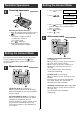
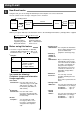
1. Press (function).
2. Press .
3. Press (select) to select the Telephone
mode (デ ンワユウセン) or Facsimile/Telephone
mode (FAXユウセン).
4. Press (register).
5. Press (stop).
ストップ
登録
選択
1 1 0
機能
or
ザイタク
=
デンワユウセン
[センタク, トウロク]
ザイタク
=FAX
ユウセン
[センタク,トウロク]
キノウ トウロク モード
Setting the Answer Mode
Setting the Answer Mode