
Facsimile with Cordless Phone Quick Reference Guide
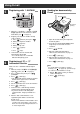
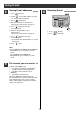


Using E-mail
13
ア
カ
サ
タ
ナ
ハ
マ
ヤ
ラ
ワ
1
2
3
4
5
6
7
8
9
0
イ
キ
シ
チ
ニ
ヒ
ミ
ユ
リ
ヲ
ウ
ク
ス
ツ
ヌ
フ
ム
ヨ
ル
ン
エ
ケ
セ
テ
ネ
ヘ
メ
レ
(濁点)
(半濁点)
``
オ
コA B
ソ
D
GH
E
ト
ノ
JK
ホ
MN
モ
P
R
ロ
WX
°
C
F
L
O
S
Y
QZ
I
VUT
( )
#
—
*
!
/
¥
?
Dial
Button
Katakana
Numeric
1
2
3
4
5
6
7
8
9
0
Letter Symbol
…
カ
→
キ
→
ク
…
カ
→
2
→C
Character
&
Button
To move the
cursor to the
left
Button
To move the
cursor to the
right
Button
To delete a
character
Button
To insert a
space
キャッチ/クリア
You can also select
characters by rotating
.
(Example:To select a
character from line
)
2
2Press .
くるくる電話帳
■
Rotate
to the right
くるくる電話帳
■
Rotate
to the left
くるくる電話帳
1
2
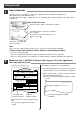
■ For entering a title
11
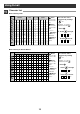
Character List
1
a
d
g
j
m
p
t
w
q
$
「 」
0}{
@
b
e
h
k
n
r
u
x
z
c
f
i
l
o
s
v
y
QZ
.
A
D
G
J
M
P
W
—
—
—
BC2
E
F
I4
3
H
K
L5
N
O6
RS
7
Y9
∼
X
TU
<>
>
8V
( )
#
%
&
*
!
/
+
=
¥
?
Dial
Button
Number of times pressed
1
2
3
4
5
6
7
8
9
0
Button
To move the
cursor to the
left
You can also select
characters by rotating
.
(Example:To select a
character from line )
Button
To move the
cursor to the
right
Button
To delete a
character
Button
To insert a
space
キャッチ/クリア
2
2Press .
くるくる電話帳
■
Rotate
to the right
1
2
…
a
→
b
→
c
くるくる電話帳
■
Rotate
to the left
…
a
→
2
→
C
[
] ”’
;:
1 234567891011121314
くるくる電話帳
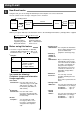
■ For entering an E-mail Address