
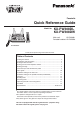
Facsimile Quick Reference Guide
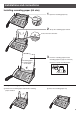
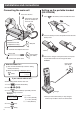


8
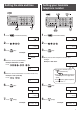
4 Enter your logo, up to 30 characters, using the dial
keypad.
To enter English characters easily, press
(Intercom) repeatedly and select “
AB
” (English and
sign input mode).
For details, see the table on page 9 for instructions.
Setting your logo
1 Press (Function/Resolution).
6 Press (Stop).
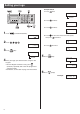
Example: Micah
1. Press once.
2. Press six times.
3. Press six times.
4. Press to move the cursor to the next space,
then press four times.
5. Press
five times.
5 Press (Set).
2 Press
.
Example :
1 2
月
1
日
15
:
4 5
ヨウケン ロクオン
0
ケン
キノウ トウロク モード
[
,
]
オス
アナタノナマエ
[
ケッテイ
]
オス
3 Press (Set).
アナタノナマエ
[
ケッテイ
]
オス
トウロク シマシタ
ナマエ
? [ AB ]
M
Cursor
ナマエ
? [ AB ]
M
i
ナマエ
? [ AB ]
M
i c
ナマエ
? [ AB ]
M
i c a
ナマエ
? [ AB ]
M
i c a h
ナマエ
? [
カナ
]
Cursor