
Facsimile Quick Reference Guide




23
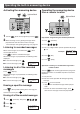
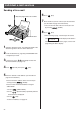
Individual e-mail services
7Enter the e-mail address, up to 60 characters (see the
table on page 8 for instructions).
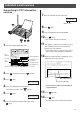
Storing names and e-mail
addresses in the addressbook
3Press (Set).
4Press (Function).
1Press (Function), then press (E-mail).
2Press (Search button) repeatedly until the
following is displayed.
5Enter the name, up to 12 characters (see the table on
page 8 for instructions).
8Press (Set).
●
To program other items, repeat steps 5 to 8.
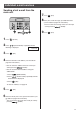
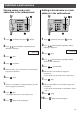
Editing a stored name or e-mail
address in the addressbook
7Press (Set).
5Press (Function/Edit).
3Press (Set).
1Press (Function), then press (E-mail).
2Press (Search button) repeatedly until the
following is displayed.
8Edit the e-mail address (see the table on page 8 for
instructions).
●
If you do not need to edit the e-mail address, skip to
step 9.
10Press (Stop) to exit the program.
4Press (Search button) repeatedly until the
desired name is displayed.
アドレスシ チョウ
カイセシ[ケッテイ]オス
6Press (Set).
アドレスシ チョウ
カイセシ[ケッテイ]オス
9Press (Set).
6Edit the name (see the table on page 8 for
instructions).
●
If you do not need to edit the name, skip to step 7.
9Press (Stop) to exit the program.