
User Guide


1. Introduction and Installation
11
For Fax Advantage assistance, call 1-800-435-7329.
L To select features or feature settings
during programming (page 74).
L To navigate to the next operation.
R {GREETING/CHECK}
L To check a greeting message (page 66).
S {SP-PHONE}
L For speakerphone operation (page 36,
37).
T {MUTE}
L To mute your voice to the other party
during a conversation. Press this button
again to resume the conversation.
U {FLASH/CALL WAIT}
L To access special telephone services
such as call waiting (page 43) or for
transferring extension calls.
L The flash time can be changed (feature
#72 on page 79, or page 86).
V {REDIAL/PAUSE}
L To redial the last number dialed from the
base unit (page 36).
L To insert a pause during dialing.
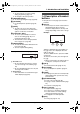
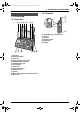
Description of base unit display (Example)
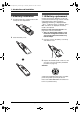
1.4 Description of handset
buttons
L Keep the front cover page open for button
locations.
A Soft keys
L These 3 keys are used to select functions
displayed directly above each key.
Functions displayed above the keys will
change depending on the state of usage.
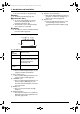
Example:
“PLAY” is displayed above the middle soft
key (1) and “C” is displayed above the
right soft key (2).
To s e l ect “PLAY” function, press the middle
soft key (1).
To s e l ect “C” function, press the right soft
key (2).
L When a function does not appear above a
soft key, the soft key has no function.
B {TALK}
L To make/answer calls (page 35, 37).
C {SP-PHONE}
L For speakerphone operation (page 35,
37).
D {TONE}
L To change from pulse to tone temporarily
during dialing when your line has rotary
pulse services.
E {HOLD/INTERCOM}
L To put a call on hold (page 36).
L To page or locate another handset (page
49).
L To transfer a call (page 49).
F {VOL.}, Navigator
L To adjust volume (page 29).
L To search for a stored item (page 39).
L To select features or feature settings
during programming (page 83).
L To navigate to the next operation.
G {OFF}
L To hang up (page 35, 37).
1 MAILBOX icons
L An icon will flash when there is at least
one new message in its mailbox (page
67).
L An icon will light when there are only old
messages in its mailbox.
2 MESSAGE(S)
L The total number of recorded messages
will be displayed (page 67).
1 32
1 2
10
MAILBOX
MESSAGE(S)
PLAY
C
1 2
[1]
FPG391-PFQX2058YA_en.book Page 11 Thursday, December 21, 2006 10:04 AM