
- 2.4GHz Cordless and Answering System KX-FPG176 Operating Instructions

91
openLCR
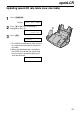
Updating openLCR rate table (new rate table)
1
Press í.
Display:
2
Press ( or ) until the following is
displayed or press 2.
3
Press w.
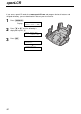
●
The OPENLCR indicator will flash and your
fax machine will automatically receive the
rate table.
●
When rate table download is completed,
the OPENLCR indicator will stop flashing
but will remain lit up and the display will
show the following:
DOWNLOAD OK!
DOWNLOAD IN
PROCESS.
NEW RATE TABLE
PRESS SETT
OPENLCR
PRESS NAVI.[I H]