
- 2.4GHz Cordless and Answering System KX-FPG176 Operating Instructions

64
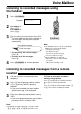
Voice Mailbox
1
Press ) 2 times
.
Display:
2
Press + or - until the desired mailbox
number is displayed.
Example:
/
3
Press LM
.
If you have programmed your own mailbox
password, enter it.
●
Only the new recorded messages will be
played.
●
If there are no new messages, the unit will
play back all the recorded messages.
4
Press {
to end the operation
.
PASSWORD=
PRESS
REC/ERASE/PLAY
NEW
_
MESSAGES
MAILBOX2
_
[±]
_
02
MAILBOX [+
_
-]
Note:
●
The following features can be used during
playback. See page 57 for details.
– To repeat a message
– To skip a message
– To stop playback
– To change the playback speed
– To erase a specific message
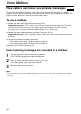
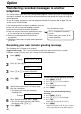
To erase all the messages in a mailbox
1. Press ) 2 times.
2. Press + or - until the desired mailbox
number is displayed.
Example:
/
3. Press h.
4. Press w.
BOX1 ERASE OK?
YES:SET/NO:STOP
PRESS
REC/ERASE/PLAY
MAILBOX1
_
[±]
_
01
SET
STOP
PLAY MESSAGES
ERASE
RECORD
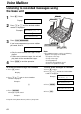
Listening to recorded messages using
the base unit!
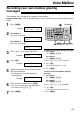
To record a memo message into a mailbox
1. Press ) 2 times.
Display:
2. Press + or - until the desired mailbox
number is displayed.
Example:
/
3. Press t.
●
A long beep will sound.
Example:
4. Speak clearly about 20 cm (8 inches) away from