
- 2.4GHz Cordless and Answering System KX-FPG176 Operating Instructions

43
Sending Faxes
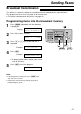
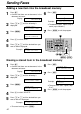
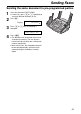
Sending the same document to pre-programmed parties
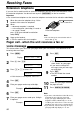
1
Insert the document FACE DOWN.
●
If necessary, press + or - repeatedly to
select the desired resolution (p. 38).
2
Press ).
Display:
3
Press + or - until the following is
displayed.
4
Press w.
● The document will be fed into the unit and
scanned into memory. The unit will then
transmit the data to each item, calling each
number sequentially.
●
After transmission, the stored document will
be erased automatically, and the unit will
automatically print a broadcast sending
report
.
<BROADCAST>
SEND:PRESS SET
DIRECTORY [+ -]
<MAILBOX>
H