
- 2.4GHz Cordless and Answering System KX-FPG176 Operating Instructions

34
Caller ID
Erasing caller information!
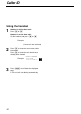
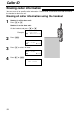
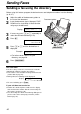
1
Handset is off the base unit:
Press & or %.
Handset is on the base unit:
Lift the handset and press & or %.
Example:
2
Press Ñ.
3
Press & to select “All clear”.
4
Press ) or Ñ.
111All1clear
0Exit
H
All clear
GF H
=Yes
H
Exit
0All clear
GF H
=Yes
0 new0call
GF
000
H
=Directory
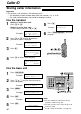
You can erase all or specific caller information. Once erased, it cannot be accessed from either
the handset or the base unit.
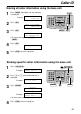
Erasing all caller information using the handset