
- 2.4GHz Cordless and Answering System KX-FPG176 Operating Instructions

12
Setup (Base Unit)
For fax advantage assistance, call 1-800-435-7329.
Note:
●
The ink film is completely safe to touch, and will not
rub off on your hands like carbon paper.
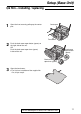
8
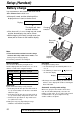
Close the back cover securely by pushing
down on the dotted area at both ends (
#
).
Close the front cover securely (
$
).
●
The following will be displayed while the unit
is checking that there is no slack in the ink
film.
Display:
PLEASE WAIT
Dotted
area
Front cover
Display
Back cover
1
2
5
For replacement only
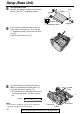
Remove the stoppers and tags from the new
ink film. Find the “T” shaped gear (blue).
Tags
New ink film
“T” shaped gear (blue)
Stopper
Stopper
6
Insert the blue core of the front ink film roll
into the right slot of the unit (
#
). Insert the
“T” shaped gear (blue) into the left slot of the
unit (
$
).
Insert the rear ink film roll (
%
).