
Cordless Telephone User Manual

48
Receiving Faxes
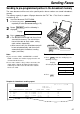
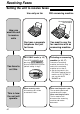
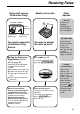
TEL/FAX mode!
(receiving voice calls with rings and fax calls
without rings when you are near the unit)
Note:
●
The fax machine will display the following when
a call is received.
Display:
●
The ringer should be on (p. 22).
INCOMING CALL
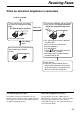
Use this mode when you are always near the fax machine, and want to receive faxes without
ringing. When a call is received, the fax machine will work as follows. To set the TEL/FAX mode,
see below.
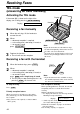
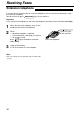
To set the TEL/FAX mode
1. Set feature #77 to “TEL/FAX” (p. 59).
2. If the arrow (
▼) is not shown on the right of the display, turn it on by pressing .
Display:
ON
▼
AUTO ANSWER
The fax machine will not ring.
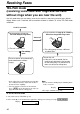
TEL/FAX delayed ring count
●
The call is connected.
Voice call
Fax calling
tone*
A call is received.
The fax machine will ring up to 3 times.
Silent fax recognition ring count
The fax machine will automatically
receive documents without
ringing.
●
The calling party will hear a different
ring back tone.
Ring
Ring
Ring
Answer the call.
●
If the call is not answered, the fax
machine will activate the fax function
for the other party’s fax machine that
does not send a fax calling tone.
* A fax calling tone is automatically generated by
the sending fax machine. Some fax machines
do not have this capability.
** If the fax machine activates the fax function,
press on the fax machine in step 2 on
page 49 to talk with the calling party.
STOP