
Flat-Bed Multi-Function Laser Fax Operating Instructions
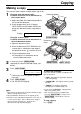
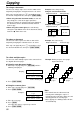

45
Receiving Faxes
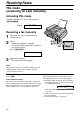
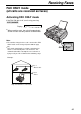
ON
FAX ONLY mode!
(all calls are received as faxes)
If the FAX ON light is off, turn it on by pressing
PQ.
Display:
●
When receiving calls, the unit will automatically
answer all calls and only receive fax documents.
FAX ONLY MODE
Line 1
– Phone calls
Line 2
– Faxes
Only a fax machine is connected.
Activating FAX ONLY mode
Note:
●
The number of rings before a call is answered in FAX
ONLY mode can be changed (feature #06 on page
62).
●
This mode should not be used with a telephone line
which is used for both phone calls and faxes. Fax
communication will be attempted even if someone is
trying to call you. We recommend the following setup:
Example: