
Operating Instruction Printer/Fax/Scanner/Copier KX-FL501C

Call Display
29
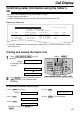
CALLER’S LIST / LISTE DES DEMANDEURS
01
02
WENDY ROBERTS
ALLAN STONE
Mar. 14 10:30AM
Mar. 13 08:35AM
FAX
FAX
1-345-678-9012
1-456-789-0123
03 MIKE TIMAR Mar. 11 09:35AM TEL
!
*
STATUS
1-987-654-3210
NO.
NO
TIME OF CALL
HEURE DES APPELS
TELEPHONE NUMBER
NUMÉRO TÉLÉPHONE
ANSWER
PRISE ÉTAT
NAME
NOM
Mar. 20 2001 09:19AM
YOUR FAX NO. / VOTRE NUMÉRO DE FAX :
YOUR LOGO / VOTRE LOGOTYPE :
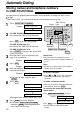
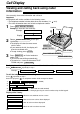
Sample of a Caller’s list
The unit will store information for the most recent 30 callers.
—To print manually, see below.
—To print automatically after every 30 new calls, activate feature #26 (p. 56).
Confirming caller information using the Caller’s
list
!
Printing and erasing the Caller’s list
!
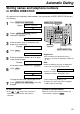
1
Press to start
printing.
Display:
●
The display will show the following after
printing.
2
Press to exit the program, or press
to erase all of the stored caller
information.
STOP
YES:SET/NO:STOP
ALL ERASE OK?
PRINTING
CALL DISPLAY PRINT
SET
STOP
Display
MENU
CALL DISPLAY PRINT
SET
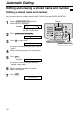
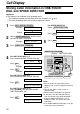
1. Press three times.
Display:
2. Press .
3. Press .
●
To cancel erasing, press , then
.
MENU
STOP
ALL ERASE OK?
SET
CALL LIST ERASE
SET
CALLER SET UP
MENU
4. Press .
5. Press to exit the program.
STOP
ERASE COMPLETED
SET
To erase caller information without printing
●
If you select “FRENCH” for the language (feature #48 on page 57), the time is shown using a 24 hour
clock (military time).