
High Speed Color Scanner Operating Instructions Model No. KV-S2025C / KV-S2025CU / KV-S2026C / KV-S2026CU KV-S2045C / KV-S2045CU / KV-S2046C / KV-S2046CU KV-S2025C KV-S2025CU KV-S2026C KV-S2026CU KV-S2045C KV-S2045CU KV-S2046C KV-S2046CU

Replacing Consumables
31
5
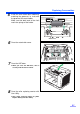
Install the new retard roller module by
matching the groove of its shaft with
the groove of the metal holder.
Make sure that both ends of the shaft
reach the springs of the holder.
6
Close the retard roller cover.
7
Close the ADF door.
≥ When you close the ADF door, close it
securely until the door is locked.
8
Clear the roller replacing counter with
User Utility.
≥ Click [Clear Counter] button for [After
Replace Roller] with User Utility.
Wider groove
Metal holder