
High Speed Color Scanner Operating Instructions Model No. KV-S2025C / KV-S2025CU / KV-S2026C / KV-S2026CU KV-S2045C / KV-S2045CU / KV-S2046C / KV-S2046CU KV-S2025C KV-S2025CU KV-S2026C KV-S2026CU KV-S2045C KV-S2045CU KV-S2046C KV-S2046CU

Replacing Consumables
28
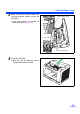
4
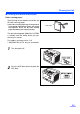
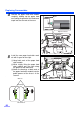
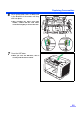
Remove the paper feed roller module
straightly, holding up the paper feed
case along the groove of the feed cover
to pull out the claw out of the case.
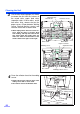
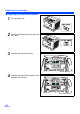
5
Install the new paper feed roller mod-
ule with its gear on the right.
1 Hang both ends of the paper feed
roller module.
2 While slightly lifting the paper feed
roller module, pass the claw along
the groove of the feed cover.
3 Attach the bearings at both ends of
the paper feed roller module into the
guide grooves of the chassis in the
scanner.
.
Claw
Paper feed case
Groove
Chassis
Bearings
Green levers