
High Speed Color Scanner Operating Instructions Model No. KV-S2025C / KV-S2025CU / KV-S2026C / KV-S2026CU KV-S2045C / KV-S2045CU / KV-S2046C / KV-S2046CU KV-S2025C KV-S2025CU KV-S2026C KV-S2026CU KV-S2045C KV-S2045CU KV-S2046C KV-S2046CU

27
Replacing Consumables
∫ Replacing the paper feed roller module
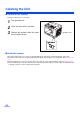
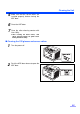
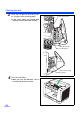
1
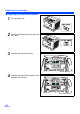
Turn the power off.
2
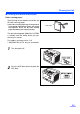
Push the ADF door release to open the
ADF door.
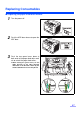
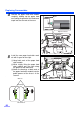
3
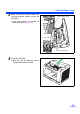
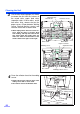
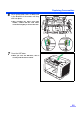
Push the two green levers down at
both ends of the paper feed roller mod-
ule to unlock the paper feed rollers.
≥ When moving the green levers, do not
apply pressure in any other direction
other than in the direction shown by the
arrows. Otherwise the levers may break.