
High Speed Color Scanner Operating Instructions Model No. KV-S2025C / KV-S2025CU / KV-S2026C / KV-S2026CU KV-S2045C / KV-S2045CU / KV-S2046C / KV-S2046CU KV-S2025C KV-S2025CU KV-S2026C KV-S2026CU KV-S2045C KV-S2045CU KV-S2046C KV-S2046CU

22
Cleaning the Unit
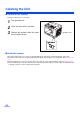
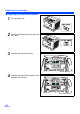
∫ Outside of the scanner
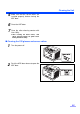
Clean the unit at least once a month.
1
Turn the power off.
2
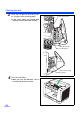
Clean the cover with a soft cloth.
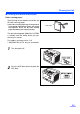
3
Remove dirt and dust from the radia-
tion vent with a brush.
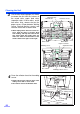
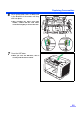
∫ Inside the scanner
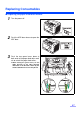
≥ Clean the unit at least once a week or when 20,000 sheets have been scanned, whichever comes first.
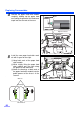
≥ Clean the rollers and sensors if paper jamming or multiple-sheet feeding occurs frequently. (Refer to pages 23-
25.)
≥ Clean the CIS glasses and sensor rollers when lines appear on the scanned images. (Refer to pages 25-26.)
≥ If the documents you scan are dirty, then the scanner components will also become dirty. To maintain proper
scanning, clean the scanner components frequently.
Radiation vent