
High Speed Color Scanner Operating Instructions Model No. KV-S2025C / KV-S2025CU / KV-S2026C / KV-S2026CU KV-S2045C / KV-S2045CU / KV-S2046C / KV-S2046CU KV-S2025C KV-S2025CU KV-S2026C KV-S2026CU KV-S2045C KV-S2045CU KV-S2046C KV-S2046CU

20
Clearing Paper Jams
Torn documents, thin documents or documents that are creased on the top edge may cause paper jams. If a paper
jam occurs, remove the jammed sheet according to the following procedure.
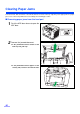
∫ Removing paper jams from the feed part
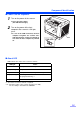
1
Push the ADF door release to open the
ADF door.
2
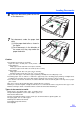
Remove the jammed document.
≥ If the jammed document remains at the
feed tray side, pull it up.
≥ If the jammed document appears at the
exit tray side, remove it from the exit side.