
High Speed Color Scanner Operating Instructions Model No. KV-S2025C / KV-S2025CU / KV-S2026C / KV-S2026CU KV-S2045C / KV-S2045CU / KV-S2046C / KV-S2046CU KV-S2025C KV-S2025CU KV-S2026C KV-S2026CU KV-S2045C KV-S2045CU KV-S2046C KV-S2046CU
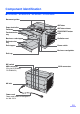
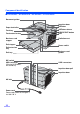

Component Identification
16
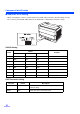
∫ About the SCSI setting
When connecting the scanner to a SCSI chain using a SCSI cable, perform the SCSI ID setting correctly.
The scanner is provided with a DIP switch for the SCSI ID No. setting and the terminator setting.
SCSI ID Setting
SCSI Terminator Setting
ID No.
Switch
Remarks
#2 #1 #0
0OFF OFF OFF
1OFF OFF ON
2OFF ON OFF
3OFF ON ON
4ON OFF OFF
5ON OFF ON
6ONONOFFDefault setting
7ONONON
Function Switch Description
Enable ON ≥ The last device in the SCSI chain
≥ Default setting
Disable OFF Not the last device in the SCSI chain