
High Speed Color Scanner Operating Instructions Model No. KV-S2025C / KV-S2025CU / KV-S2026C / KV-S2026CU KV-S2045C / KV-S2045CU / KV-S2046C / KV-S2046CU KV-S2025C KV-S2025CU KV-S2026C KV-S2026CU KV-S2045C KV-S2045CU KV-S2046C KV-S2046CU
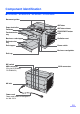
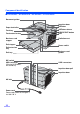

Component Identification
15
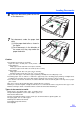
∫ Power turn-on sequence
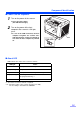
1
Turn on the power of the scanner.
≥ Press the power switch.
(The LED will now light.)
2
Turn on the power of the host
computer after scanner’s LED lights
green
.
≥ In case of the USB connection, the host
computer recognizes the scanner auto-
matically when the scanner is powered on
even after the host computer is powered
on.
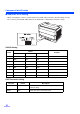
∫ About LED
LED indicates the status of the scanner as follows:
*1: The rollers need to be cleaned or replaced.
*1*2: Check the status of the scanner using the User utility.
The User utility is included in the CD-ROM.
LED light Status
Green Ready to scan or scanning
Green (flashing) Sleep mode
Orange Ready to scan or scanning with warning *1
Orange (flashing) Initializing
Sleeping with warning *1
Red An error occurred *2
LED