
High Speed Color Scanner Operating Instructions
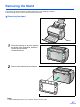
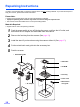
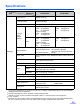
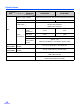
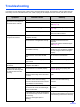
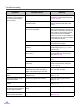
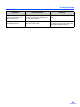
Table Of Contents
- Table of Contents
- Notice
- For Your Safety
- Component Identification
- Setting up the Scanner
- Installing Software
- Starting the Scanner Applications Automatically
- Document Specifications
- Loading Documents
- Clearing Paper Jams
- Mixed Batch Card Guide
- Cleaning the Unit
- Replacing Consumables
- Removing the Stand
- Repacking Instructions
- Specifications
- Troubleshooting
- Index

Troubleshooting
43
Scanned image has moire
fringes such as stripe or a
wavy pattern noise.
It is caused by the printing pattern of
the document and the congeniality of
the scanning resolution.
Change the resolution, and try to scan
again.
The scanning lamp(s)
periodically lights up.
The scanning lamp(s) periodically
lights up in sleep mode.
This is not an unusual event.
For details on sleep mode, refer to the
User Utility Reference Manual.
Symptom Possible Cause Remedy