
High Speed Color Scanner Operating Instructions
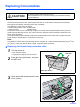
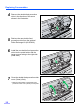
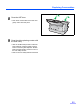
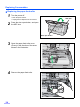
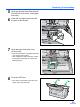

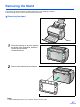
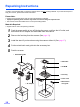
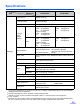
Table Of Contents
- Table of Contents
- Notice
- For Your Safety
- Component Identification
- Setting up the Scanner
- Installing Software
- Starting the Scanner Applications Automatically
- Document Specifications
- Loading Documents
- Clearing Paper Jams
- Mixed Batch Card Guide
- Cleaning the Unit
- Replacing Consumables
- Removing the Stand
- Repacking Instructions
- Specifications
- Troubleshooting
- Index

Replacing Consumables
34
Replacing the paper feed roller
1
Turn the power off.
• Push the power switch.
• Unplug the AC adaptor from the scanner.
2
Press the door open button, and open
the ADF door.
3
Open the paper feed roller cover
(Green) in the direction of the arrow
shown in the illustration.
4
Remove the paper feed roller.
Door open button
ADF door