
Operating Instructions Function Parameters


85
Chapter 6 Printer Settings
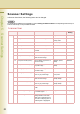
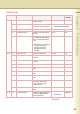
10 - 19 14 Mutual A4/LTR Set A4 and LTR (Letter)
substitute printing.
Off, On Off
15 Mailbox Memory Status Display the status of remaining
memory and remaining mailbox.
16 Print Data Print the specified data. Stop, Start Stop
17 PDF Password Input Set value to “On” to add a PDF
password.
Off, On Off
18 SD Print Colour Mode Set colour mode for printing a
file of Word/PowerPoint/PDF by
MCP(*1) or PDF direct printing
by PS.
*1: MCP (Memory Card Printing
Utility) is included in the
Panasonic Document
Management System
CD-ROM.
Colour, Black Colour
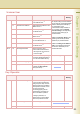
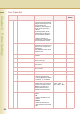
20 - 29 20 Custom Size Unit Set the user-defined unit. mm, inch mm
21 Custom X Size Set the user-defined size in the
X direction.
100 to 305 (mm)* 305 (mm)
22 Custom Y Size Set the user-defined size in the
Y direction.
148 to 457 (mm)* 457 (mm)
23 Wide A4 Set whether to use Wide A4. Off, On Off
25 Mono Page Detect Set whether to use Mono Page
Detect.
Off, On On
26 Toner Save Set whether to use Toner Save
mode.
Off, On Off
27 Auto Contrast Mode Set whether to use auto contrast
mode.
Off, On Off
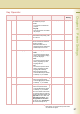
28 SD/PC Card Def. Dir. Set the default directory setting.
z Set DCIM, display DCIM
folder in the SD card as
default directory.
DCIM, Scan Img DCIM
29 SD/PC Card Display Type Set the default display type
setting.
Thmbnail, FileList Thmbnail
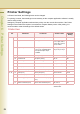
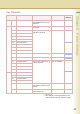
30 - 34 34 Key Operator Mode Enter the key operator password
to display the Key Operator
Menu (see page 86).
00000000
*Select “Input”, and then enter the
desired value.
Printer User
No. Parameter Comments Selective Item Standard
Setting