
Operating Instructions Function Parameters

71
Chapter 4 Fax/Email Settings
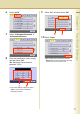
6
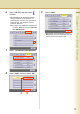
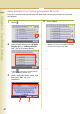
Select “40-79”.
7
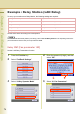
Select “43 Password-Transmit” or
“44 Password-Receive”.
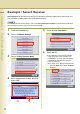
8
Enter the Identification Code (4-digit),
and then select “OK”.
(Ex: Password-Transmit screen,
password: 5678)
z If you have made an input error, select
“Clear” on the screen to delete all
characters at a time.
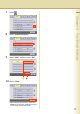
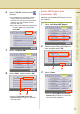
9
Select “On”, and then select “OK”.
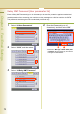
10
Select “Close”.
z After setting up the function(s), press the
Reset key to return the machine to the initial
screen of the current active mode.