
Operating Instructions Function Parameters

94
Chapter 7 Counter View
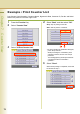
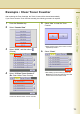
Example : Print Counter List
Print Counter View information. Customer Name, Signature & Date, Customer ID, Fax No. and Serial
Number are printed on the lower right corner.
1
Press the Function Key.
2
Select "Counter View".
3
Select "00 Print Counter List".
4
Select "Start", and then select "OK".
Stop : Stop to printing counter list
Start : Start to print the counter list
z To cancel printing the parameter setting list,
press “Stop” and “OK”.
While processing the cancellation, panel
operation is denied, and an error beep is
produced.
The feeding paper(s) will be ejected before
completing the above cancellation
operation.
5
Select "Close".
When the list printing is completed, screen will
be returned to step 3.