31
Chapter 2 General Settings
8
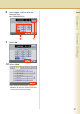
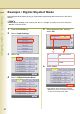
Select “Input”, and then enter the
Date and Time.
Ex: 01/08/2006 00:00
9
Select “OK”.
10
Select “Close”.
z After setting up the function(s), press the
Reset key to return the machine to the initial
screen of the current active mode.