
Operating Instructions Function Parameters


13
Chapter 2 General Settings
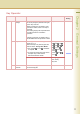
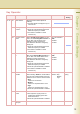
0 - 19 05 Special Paper
Tray 1
Set the paper tray which will not be used as
the automatic document feeder tray.
Ex:
When you load colour paper in Paper Tray
1, select “Tray 1” not to be used for
automatic tray selection.
z Up to 4 paper trays can be selected for
exclusion from automatic tray selection.
None, Tray 1,
Tray 2, Tray 3, Tray 4,
Bypass
None
06 Special Paper
Tray 2
None
07 Special Paper
Tray 3
None
08 Special Paper
Tray 4
None
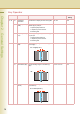
09 Auto Paper Out
Rotate
Set whether to rotate the image and print
when the selected paper tray is empty.
Ex:
Printing on A4-R size paper when there is
no A4 size paper
Off, On Off
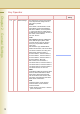
10 Copy Output Tray Set an output tray for the copier function.
z Outer is available for selection when the
optional Paper Transport Unit is installed.
Inner, Outer Inner
11 Printer Output
Tray
Set an output tray for the printer function.
z Outer is available for selection when the
optional Paper Transport Unit is installed.
Inner, Outer Inner
12 Fax/Email Output
Tray
Set an output tray for the Fax/Email function.
z Outer is available for selection when the
optional Paper Transport Unit is installed.
Inner, Outer Inner
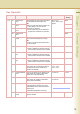
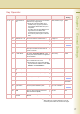
13 Auto Reset Time If you do not select any key within a given
time period, the touch panel goes back to
the initial screen of the current active
function automatically.
None, 30 sec.,
1 min., 2 min.,
3 min., 4 min.
1 min.
14 Power Save Mode
Timer
If you do not select any key within a given
time period, the machine is switched to
power save mode automatically.
1 to 240 min. 15 min.
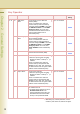
15 Sleep Timer If you do not select any key within a given
time period, the machine is switched to
sleep mode automatically.
None,
1 to 240 min.
22 min.
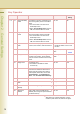
17 Language Default Set the display language.
If the language is changed, the system
automatically returns to the initial function
setup screen.
z Standard Setting differs by country.
18 Panel Beep
Sound
Set the volume of Beep Sound when the
panel is selected.
Off, Soft, Loud Soft
Key Operator
No. Parameter Comments Selective Item
Standard
Setting