
Operating Instructions Function Parameters


51
Chapter 4 Fax/Email Settings
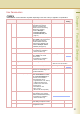
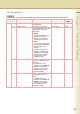
40 - 79 44 Password-Receive
Register the 4-digit password first.
Set whether the machine
performs and checks the
password of the transmitting
station when receiving.
z
Refer to
Example :
Password-Transmit /
Password-Receive (see
page 70)
.
Off, On Off
46 Select Receive
Enable or disable selective reception.
When “Valid” is set, the machine
will receive only when the
sender’s address has been
programmed in address book.
z Refer to Example : Select
Receive (see page 72).
Invalid, Valid Invalid
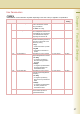
48 Telephone Line
Selecting the type of the connected.
z This feature is available in
certain countries only.
PSTN, PBX PBX
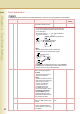
49 PSTN Access Code When “48 Telephone Line” is
set to “PSTN”, set PSTN
Access Code
z This feature is available in
certain countries only.
Up to 4-digit
52 Diagnostic Password Set the diagnostic password. z
Consult with the authorized Panasonic
dealer on how to use this item.
53 Sub-Address Password Set the sub-address password. Up to 20 digits
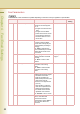
54 Fax Forward Set whether the machine
performs Fax Forwarding to the
specified destination.
Invalid, Valid Invalid
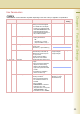
56 Cover Sheet (HOME) Set the default cover sheet.
When “
Cover Sheet
” is set to “
On
”,
and “
Cover Sheet Message
” is
set to “
On
”, enter characters.
z 60 Characters can be
programmed for 1 line, and up
to 600 characters can be
printed on the cover sheet.
z Printing Area
60 characters / line
Max. 10 lines
(Dot line will not be printed.)
Off, On Off
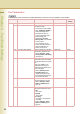
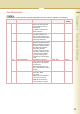
57 Destination Code Selecting the destination code
when installing your machine.
Selective Item,Standard Setting
z This feature is available in
certain countries only.
68 Dial Tone Check
Set whether to detect dial tone
before dialling the telephone number.
Off, On On
77 Department Code
Enable or disable the department
management function.
Invalid, Valid Invalid
Fax Parameters
z The contents of Fax Parameter may differ depending on the each country’s regulation or specification.
No. Parameter Comments Selective Item
Standard
Setting