
Operating Instructions Function Parameters



47
Chapter 4 Fax/Email Settings
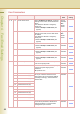
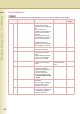
0 - 39 07 Header Print Select the printing position of
sender’s information (Header)
on the received original.
•Inside
Sender’s information is
printed on the image.
• Outside
Sender’s information is
printed outside the image
without overlap.
•No Print
Sender’s information is not
printed.
Inside, Outside,
No Print
Inside
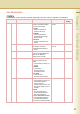
08 Header Format Select what contents to use for
the sender’s information.
z Standard Setting differs by
country.
Logo, ID
From To
From To
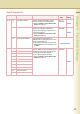
09 RCV’D Time Print Select whether the machine
prints the received date & time.
When set to “Valid”, the
reception time is printed.
Invalid, Valid Invalid
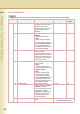
12 Comm. Journal (HOME) Select the printing attributes for
the communication journal.
•Off
Communication journal is not
printed.
• Always
Prints whether
communication has
succeeded or failed.
• Inc Only
Prints only when
communication has failed.
Off, Always, Inc Only Inc Only
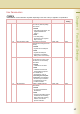
13 Auto Print JRNL
• Invalid
Communication journal is not
automatically printed. If
required, view the
communication journal on the
touch panel display, or print it
manually.
• Valid
The machine prints the
journal automatically after
every 200 transactions.
z Refer to Transaction Journal
in the Operating Instructions
(For Facsimile and Internet
Fax) on the provided CD-ROM.
Invalid, Valid Valid
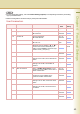
Fax Parameters
z The contents of Fax Parameter may differ depending on the each country’s regulation or specification.
No. Parameter Comments Selective Item
Standard
Setting